




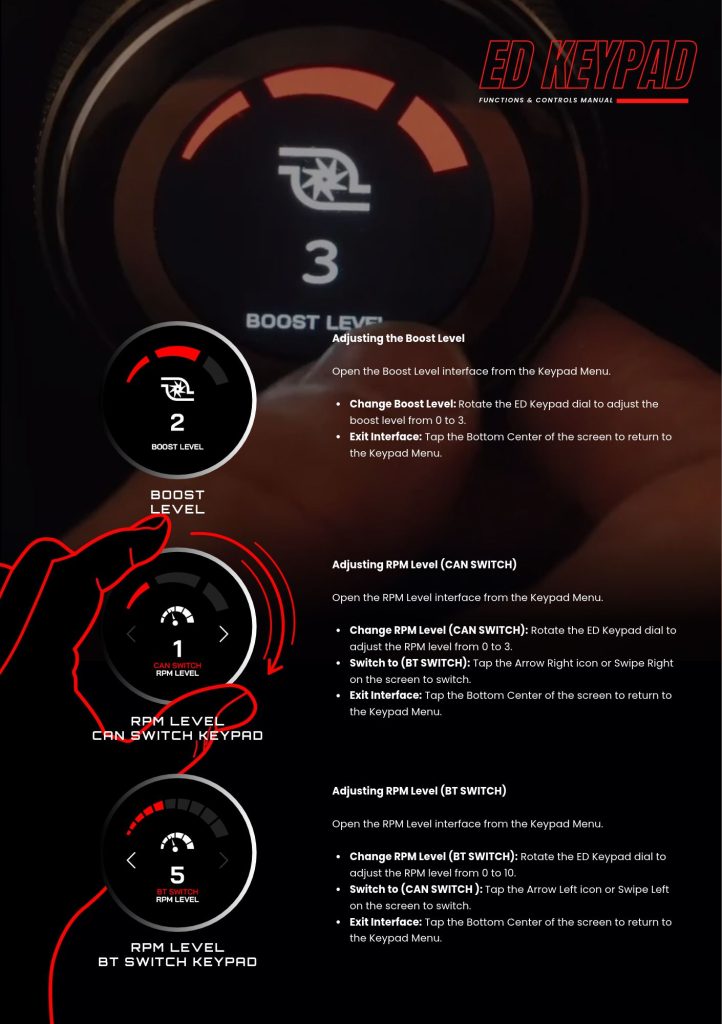
Open the Keypad menu, then Boost Level or RPM Level, and rotate the dial. Boost level adjusts from 0 to 3. RPM level adjusts from 0 to 3 on the CAN switch, or from 0 to 10 on the BT switch.
Changing boost or tune from a dial in your line of sight, mid session, is the reason to fit this device. It removes the laptop from the loop for the adjustments a driver actually makes between runs.
| Interface | Range |
| Boost Level | 0 to 3 |
| RPM Level, CAN switch | 0 to 3 |
| RPM Level, BT switch | 0 to 10 |
In the RPM Level interface, tap the right arrow or swipe right to move from CAN switch to BT switch, and the left arrow or swipe left to go back.
⚠️ Confirm what each level does on your tune before using it. Boost level 3 on one map is not boost level 3 on another. Ask your tuner what each position is set to.
Related: CAN Keypad or MaxxECU BT Keypad: What Is the Difference · Navigating the ED Keypad Main Menu · How to Connect MaxxECU to EliteDash

